

How to prepare your Raisin statement for the 720 tax form
1️⃣ Download the tax report
Download the document “Summary - Tax Information” from Raisin.
It is usually available at the end of February.
2️⃣ Is this your first time filing the 720?
- ✅ First time → You only need the report for the current financial year.
- ✅ You have presented it before → You need:
- The report for the current financial year.
- The report for the last year in which you filed Model 720 and included Raisin.
This allows the correct identification of additions (A), modifications (M) or cancellations (C).
3️⃣ Generate CSV file
- Copy the data from the PDF of the Raisin report.
- Paste them in:
- Notepad (Windows)
- TextEdit in plain text mode (Mac).
- Save the file in .CSV.
This file will be the one you will attach in the purchase process to generate your Form 720 automatically.
4️⃣ Prepare more extracts
If you have other assets to declare that you have abroad. Check the general instructions for the Model 720.
5️⃣ Purchase of the Auto-720 service
Prepare a ZIP file with all the extracts you need and have prepared in step 4.
Use that ZIP to attach it when you checkout.
⚠️ Remember:
- You only have to declare the block of accounts if it exceeds 50,000 € at 31 December.
- Accounts/deposits opened and completed in the same year, are not included in the 720 model..
- E.g. a deposit is opened on 1 February 2025 and ends on 1 July 2025, will not be included in your 720 tax return. Therefore, the total of accounts in the PDF report may not be the same as the result calculated by Autodeclaro.
Below you can watch a video with the most important steps of the process:
The steps to follow are:
1/ Open the document PDF of the fiscal report of Raisin with the browser "Google Chrome.
If you don't have it installed, you will have to download the programme and install it.
Open the PDF document in the browser “Google Chrome”.”
Note: Avoid opening the PDF with the programmes "Adobe Acrobat and “Mac Preview” as the information is not copied correctly.
1.1/ Open PDF tax report in Windows:
You can open the PDF report by selecting the file with the right mouse button and choosing from the context menu “Open with” -> "Google Chrome

1.2/ Open PDF tax report in Mac:
You can open the PDF report by right-clicking on the file and selecting the contextual menu “Open with” -> “Google Chrome”

2/ Go to page 6 and select to copy of the tax report the content of the table in section “Investments abroad” from the head “Details of the contracted product”.” to the end of the “Investments abroad” (the image below shows the selected content in blue).
Note: When selecting the text, if the table occupies several pages of the pdf, there are two options to move the cursor down:
- Hold down the left button and scroll down through the PDF using the “mouse wheel”.”.
- Hold down the left button and scroll down the PDF using the left mouse button. “down arrow”.
- Hold down the left button and scroll down through the PDF using the key “Pag Ave.” (next to FIN key)

In this example, you have to select until you reach the last column of the last row, where the amount of 0,00 €
You have two options for copying:
- Press “Control + C“
- Right click on the selected text and “copy”

3/ Open the programme “Notepad” (“Notepad”) or the Windows "Text-edit and paste the content previously selected and copied from Raisin's PDF tax report.
How to open the programmes is explained below:
3.1/ Open the programme “Notepad in Windows.
- Write “notepad” or “notepad”.” in the bottom bar, to search for the programme

- The “notepad” or “Notepad” application will appear. Click on it to open the program.

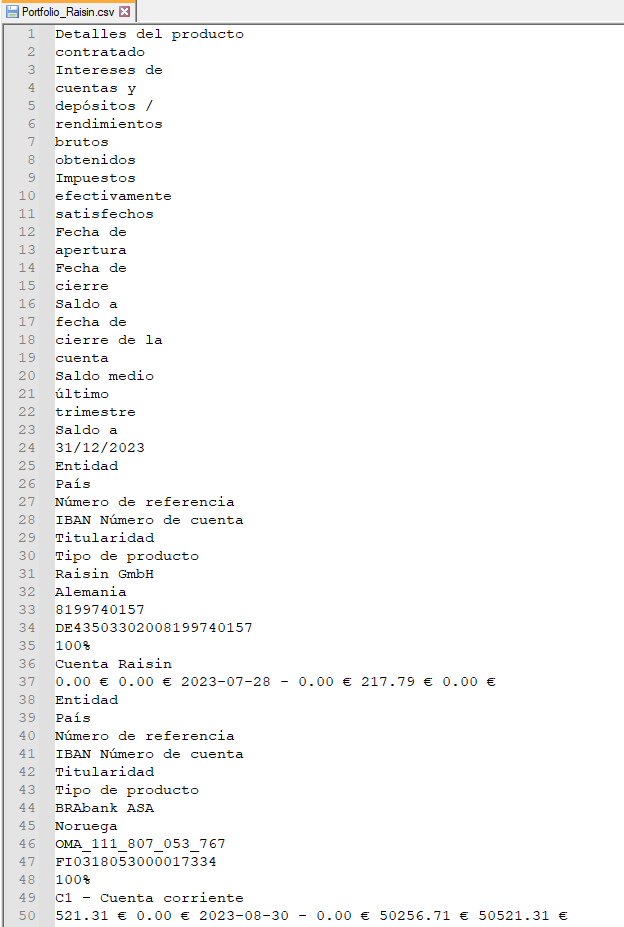
- Once opened, paste the content previously copied from the PDF. It will have the following format:

- Once you have pasted into Notepad the content that has been copied from the PDF, save it under the name “Portfolio_2025.csv”.“


3.1/Open the programme "Text-edit on Mac.
- Go to “Apps” in the bottom bar

- Write “Text-Edit”

- Once opened, go to “New Document“

- Go to the top menu of “TextEdit”. Go to “Format” -> “Convert to plain text”.”

- Right-click to go to the context menu to “Paste”

- Once the content has been pasted, go to the top menu of “TextEdit”. “Archive” -> “Save”.”

- Indicate the name of the file. E.g. “Raisin_2025.csv” and “Save”.

Note 2: If you use Mac, you should use the “Text-edit” program and check the settings.
Note : If your name and surname appear (it appears if you copy several pages of the PDF), you could delete those lines with name and surname, as they are not necessary. The process of generating your form 720 is completely anonymous.
4/ Structure of the result Once the above steps have been carried out, an example of the structure with the information that has been incorporated/pasted in is shown.
If the content you have pasted does not have a similar structure, go back to step 1 to open the PDF with another valid programme.
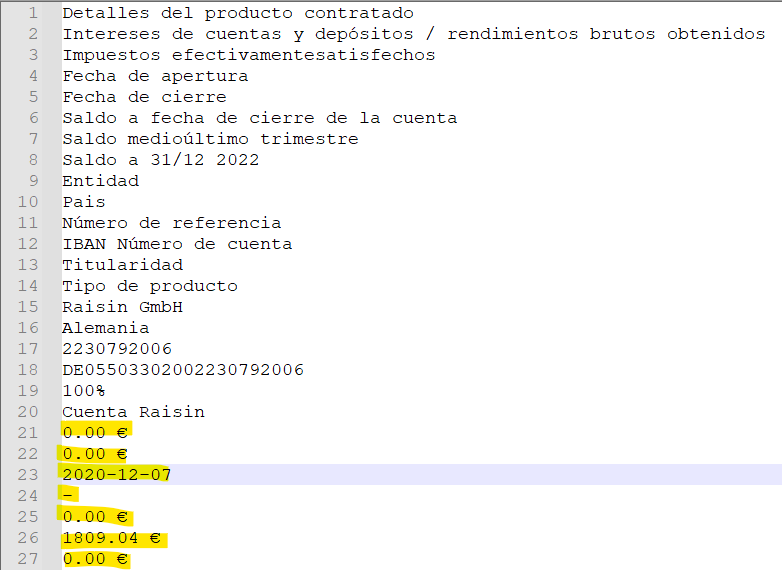
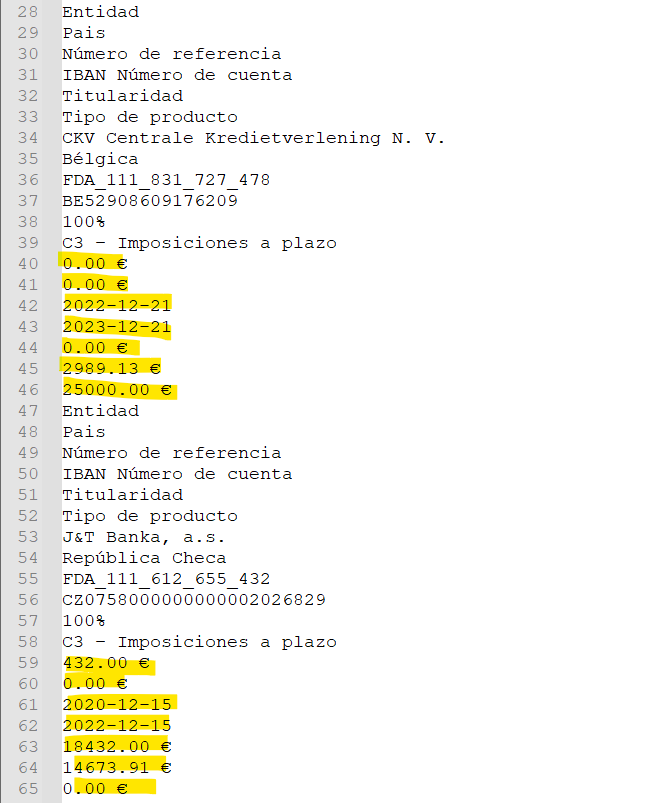
Note: The amounts could also be shown on separate lines as shown below, this would be entirely correct.
5/ Purchase of the Auto-720 service to obtain your completed form 720:
Once you have all the position statements as at 31 Dec you can purchase the service. “auto-720” to obtain your completed Form 720 in a few minutes.
Remember that you have to make a ZIP if you have more than one statement, for example if you want to add another broker or also include the Raisin statement from another year if you filed the Form 720 previously.
- At Windows, To ZIP the files, just select the files and right-click on them. “Compress to...” -> “ZIP file” -> "ZIP file”

- At Mac, To ZIP the files, just select the files and right-click on them. “Compress”.

DO YOU USE MAC?
In those brokers where it is necessary to copy information from the PDF, it is recommended to do the following in the “Text Edit” programme.
1/ Choose format “Convert to plain text”.”

2/ The display format will change

3/ Once you have pasted the content, save the file in UTF-8 format with the extension “.csv”.”

 Español
  English (UK)
  Deutsch
  Français