
Auto 720 - Excel Template
Form 720 is not only for securities deposited abroad through brokers, but also for any assets deposited abroad, such as securities held abroad:
- Bank or credit accounts.
- Values or rights.
- Shares and units in the share capital or equity fund of Collective Investment Undertakings.
- Life or disability insurance and temporary or life annuities.
- Ownership and rights in rem in immovable property.
For this purpose we provide a Excel template where you can enter all your assets deposited abroad.
Here we show you how it works and the steps to follow to obtain your Form 720. There are two ways:
1- Completed through the plantilla Excel. (Explained in this section)
2- A través del extracto de tu bróker (Explicado en este otro articulo)
The table of contents of this article is:
- Prepare excel template Model 720
- Generate BOE 720 file (Purchasing process)
- Import and file with the Tax Agency, the Provincial Councils of Guipúzcoa, Vizcaya and Álava, and the Treasury of Navarre.
Prepare excel template Model 720
Si tienes un bróker o bienes que no se ajustan a los que Autodeclaro trabaja con el extracto de tu bróker, puedes generar un Excel personalizado rellenándolo tu mismo. Los pasos serían:
- Get Excel template in: model720-2025 - Google Spreadsheet
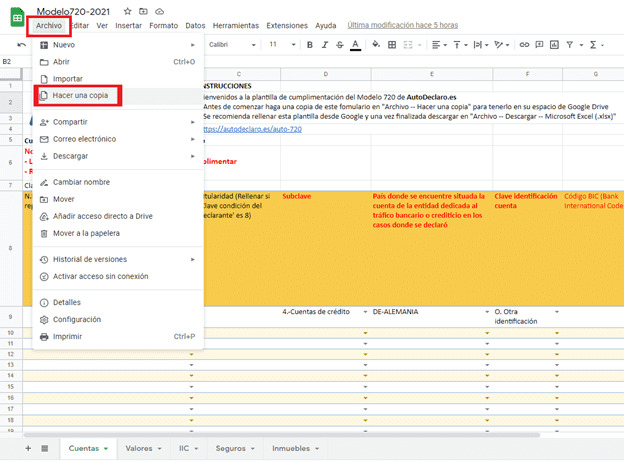
- Once you have opened the template, make a copy to your google drive.
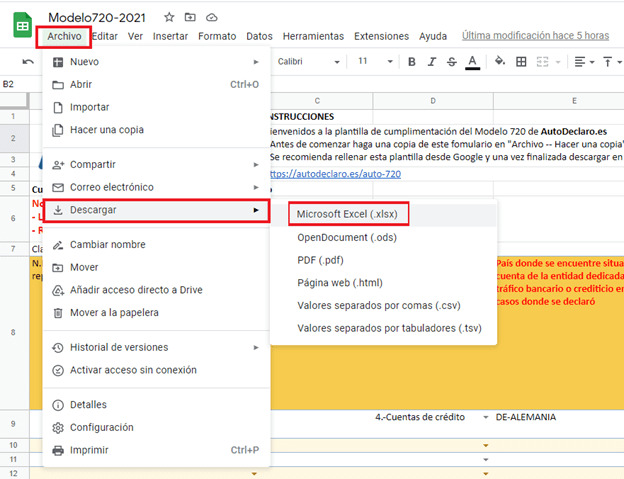
- Fill in the template, and once completed, download it in the following format .xlsx
- Note: Si quieres generar el modelo 720 para un ejercicio anterior. Indicarlo en el nombre del fichero:
- Ej: Por ejemplo si se quiere generar el modelo 720 para el ejercicio 2023, el nombre del fichero Excel es: Modelo720_2023.xlsx y comprimir el archivo en un archivo ZIP.
- Note: Si quieres generar el modelo 720 para un ejercicio anterior. Indicarlo en el nombre del fichero:
Once you have all the statements of position as at 31 Dec and transactions (if you filed the Form 720 before), make a ZIP with all of them and you can buy your completed Form 720 in a few minutes.
Generate BOE 720 file (Purchasing process)

- Choose the desired "version" and "add to cart".


- Selecciona el fichero “.xlsx” anteriormente descargado desde Google sheets ( o ZIP file si quieres generar el modelo 720 de un año anterior o has aportado mas extractos de otras plataformas).
- Incluya la dirección de correo electrónico donde también desea recibir el modelo 720 resultante.
- Accept the terms and conditions, and finally "Place the order"..
- Once the Form 720 has been filled in automatically, you will see in the order confirmation a link to "download your Form".
Note: It is also sent to the email address you previously indicated.

Import and file with the Tax Agency, Provincial Councils of Gipuzkoa, Bizkaia, Alava and the Navarre Tax Office
At this article we explain how to import the Modelo 720 file generated by Autodeclaro according to the tax office that corresponds to you.
Help
Navegation
Legal
Follow us
See our reviews at:

© 2021 AUTODECLARO.ES - All rights reserved
SOFTWARE DEVELOPED IN SPAIN
 Español
  English (UK)
  Deutsch
  Français