
DOWNLOAD GUIDE MODEL 720
Your statements from DEGIRO,
step by step.
Download your portfolio as at 31 December and prepare the files you need for Auto 720.
BEFORE YOU START
What do you need to download?
It’s your first Model 720
The statement of open positions as at 31 December of the financial year for which you are filing your tax return.
Find out how to download itYou’ve already submitted it
Add the figures for the last financial year reported and the transaction statements relevant to your case.
See what you need to addKeep the original CSV file. Do not open it; save it in Excel or Numbers instead. If you want to check its contents, use a copy.
THE DOWNLOAD
Get your wallet in three steps.
-
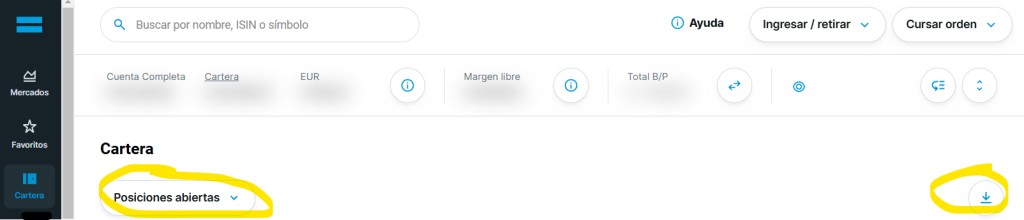
Open your positions with DEGIRO
Log in to your account and follow these steps. Then, click on the download icon on the right.
PortfolioOpen positionsExport / download
Find «Open positions» and the download icon.Enlarge screenshot -
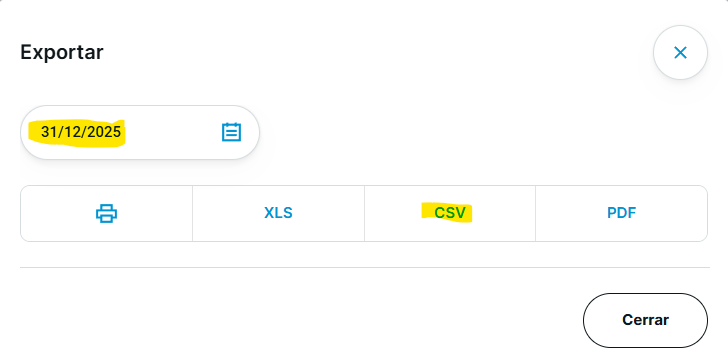
Select the date and download the CSV file
Select the 31 December of the financial year for which you are filing your tax return and press CSV.
The screenshot uses 2025 as an example. Select your financial year.Expand -
Save the file with its year
Add the year to the name and keep the file extension .csv. For example, for the 2025 financial year:
DEGIRO_2025.csvExample of a nameIf Numbers opens automatically on your Mac, close it without saving and use the downloaded file.
ONLY IF YOU HAVE ALREADY SUBMITTED IT
Please complete the above documentation.
As well as the portfolio for the financial year you are going to declare, please prepare the following:
The portfolio for the most recent financial year
Repeat the download with the date 31 December of that financial year. Also include the year in the file name.
Transactions, excluding dividends
They are used to complete the dates and sale amounts for previously reported positions.
How to download transactions (in a new tab)AN EXAMPLE
You’ve set your sights on 2023 and are now preparing for 2025.
In this case, please gather these four files:
- Positions as at 31 December 2023
DEGIRO_2023.csv - Positions as at 31 December 2025
DEGIRO_2025.csv - Transactions in 2024
Transactions_2024.csv - Transactions in 2025
Transactions_2025.csv
The names are examples. Include the year and keep the CSV format.
The transaction guide also includes instructions for Renta. For Form 720, do not attach the dividend history.
FINAL CHECK
Your files, ready to send.
Please check these three points before continuing:
The date is correct. The balance sheet extracts are as at 31 December of the financial year indicated.
The year is included in the name. This will help you tell the files for each exercise apart.
CSV files retain their original format. If you have several files, group them into a single ZIP file to attach during checkout.
You can now continue with Auto 720.
OTHER QUESTIONS
We’ll answer your questions.
What about the cash in my DEGIRO account?
Cash is processed separately: it is not part of DEGIRO’s automated securities processing and must be entered manually.
See DEGIRO’s cash withdrawal instructions →What about positions in other currencies?
Autodeclaro recalculates the value in euros using the ECB exchange rate at the end of the financial year. This is why it may differ from the amount in euros shown on the DEGIRO statement.
Can I include files from various brokers?
Yes. Compile your statements into a single ZIP file and label the files by organisation and financial year. Use the relevant guide to download the statements from each broker.
Back to all organisations →What should I do if I need to file a tax return for a previous financial year?
If you are going to submit Form 720 after the deadline, please contact Autodeclaro before placing your order to confirm which documents you need.
Check my case →Screenshots and instructions for DEGIRO’s guide to Autodeclaro.
 Español
 English (UK)
 Deutsch
 Français