
DOWNLOAD GUIDE MODEL 720
Your statements from Firstrade,
step by step.
Download your documentation and prepare the files you need for Auto 720.
BEFORE YOU START
What do you need to download?
You’ve already submitted it
Please attach the accounts for the most recent financial year in which you included this entity.
See what you need to add ↓THE DOWNLOAD
Prepare your statement, step by step.
View your account statements
AccountsE-DocumentsStatementsDownload the December document for the financial year you are preparing.
Open Firstrade →Copy the league table
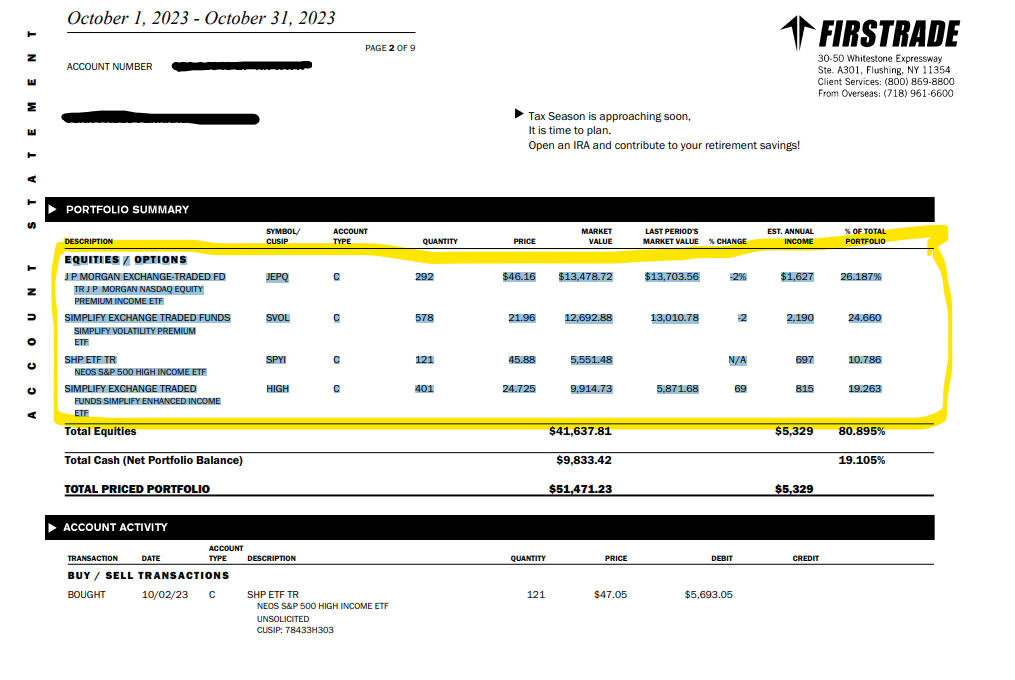
Select the highlighted content in the PDF, including the headings and all items.

Copy the league table. The data in the screenshot is for illustrative purposes only.Expand + Save your file
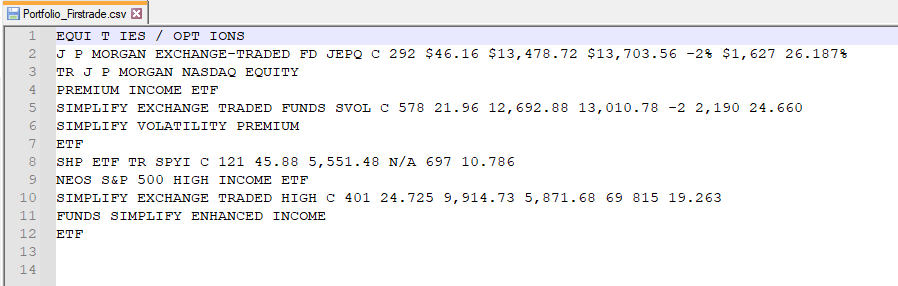
Paste the content into Notepad (Windows) or TextEdit in plain text mode (Mac). Retains the headers, rows and order of the data. Saves the file with the extension .csv and includes the word ‘exercise’ in the name: for example,
Firstrade_2025.csv.Save your file. The data in the screenshot are examples.Expand +
ONLY IF YOU HAVE ALREADY SUBMITTED IT
Please complete the above documentation.
As well as the portfolio for the financial year you are going to declare, add that of the most recent financial year for which accounts have been filed in which you included this entity. Identify the financial year in each file.
AN EXAMPLE
The last tax year you declared was 2023.
If you’re preparing for 2025 now, gather the extracts from 2023 and 2025. If there were any sales or cancellations, check how to fill in the relevant details; position statements do not always contain this information.
FINAL CHECK
Your files, ready to send.
The exercise is correct. Check the dates on the documents and the year stated in their names.
There is no missing information. It includes all the items, pages and headings specified in this guide.
The format is retained. Check the file extensions. If you have several files, group them into a single ZIP file.
You can now continue with Auto 720.
OTHER QUESTIONS
The details of your case.
How do I save a CSV file as plain text?
On Windows, use Notepad and save the file with a .csv extension. If the programme adds .txt, select «All files» when saving. On a Mac, use TextEdit → Format → Convert to plain text before pasting the data.
Renaming a PDF or Excel file to «.csv» does not convert its contents. Please follow the copying or exporting instructions provided for this file type.
My document is in a different format
Do not alter figures, columns or identifiers to make them fit an example. Check with Autodeclaro if the structure does not match.
View my statement →Instructions and screenshots based on the original Autodeclaro guide →. The screenshots retain their original format and may show previous exercises.
 Español
 English (UK)
 Deutsch
 Français